What Is the Basic Structure of a Desktop Robot?
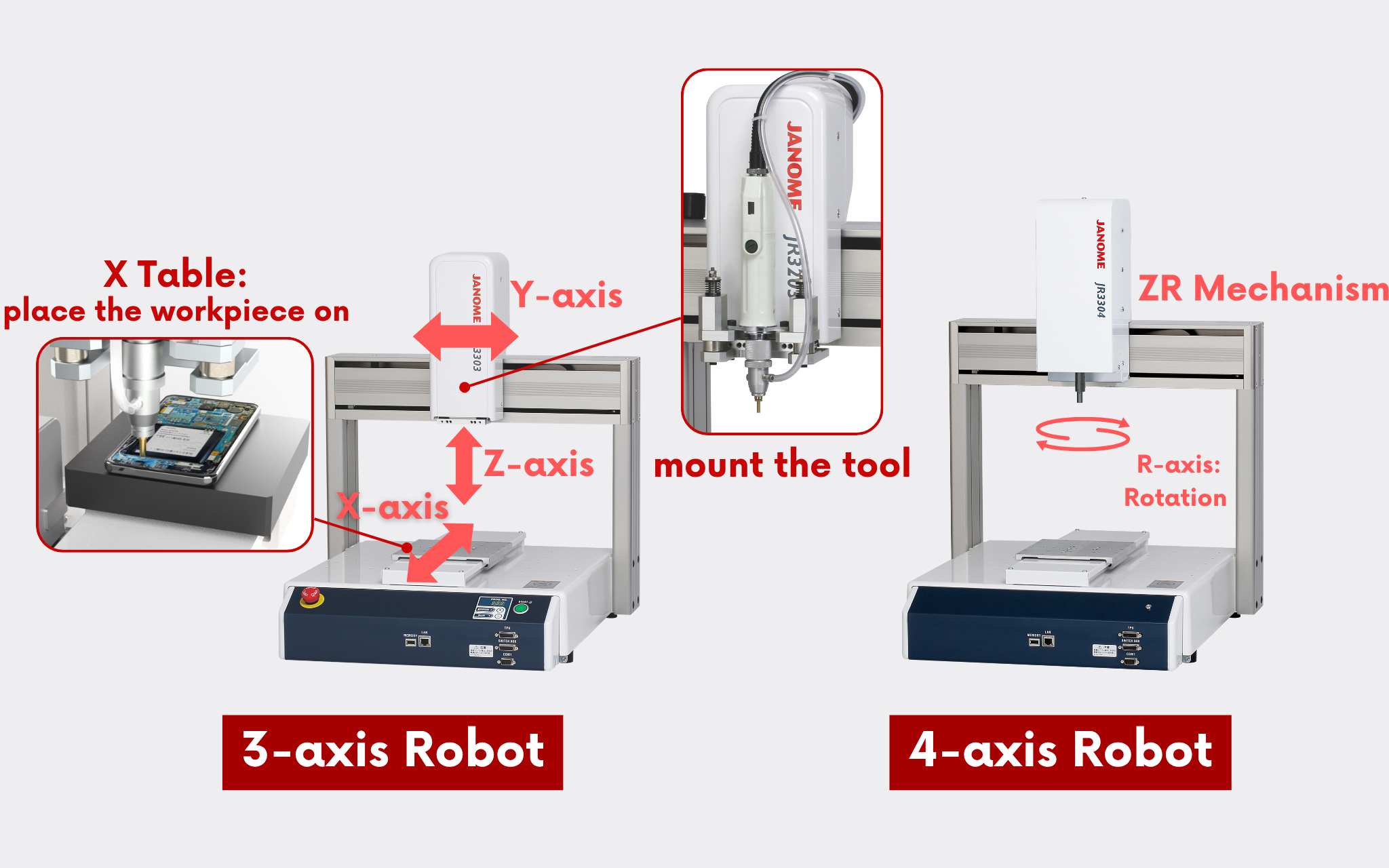
A desktop robot is a 3-axis or 4-axis (with an additional R-axis for rotation) robot based on a Cartesian coordinate system.
The workpiece is placed on the X table, where the X-axis moves back and forth, the tool moves left and right along the Y-axis, and up and down along the Z-axis.
Each axis is driven by a stepper motor.
Key Applications of Desktop Robots and Suitable Production Methods
JANOME's desktop robots are available in five size variations (see table below), allowing users to select the most suitable model based on their specific application and the size of the workpiece.
| Operating Range [mm] | Maximum Portable Load [kg] | ||||
|---|---|---|---|---|---|
| X | Y | Z | R * | Workpiece | Tool |
| 200 | 200 | 50 | ±360° | 7 | 3.5 |
| 300 | 320 | 100 | 15 | 7 | |
| 400 | 400 | 150 | |||
| 510 | 510 | ||||
| 510 | 620 | ||||
*For 4-axis robots.
Desktop robots require the workpiece itself to be fixed onto the X table and moved during operation.
As shown in the table above, it is important to note that the standard model does not support workpieces exceeding 15 kg in mass.
Note: The JR3000 series with a Heavy-Duty specification can handle workpieces up to 20kg.
Due to these characteristics, desktop robots are generally well-suited for standalone cell production, where each unit operates independently.
However, in recent years, there have also been increasing examples of desktop robots being integrated into production lines in combination with collaborative robots (cobots), arranged in parallel configurations, or customized into systems that work in sync with conveyors.
【Videos】JANOME Automated Assembly Line
The desktop robot excels particularly in ultra-precise operations on small workpieces.
Typical examples include micro dispensing tasks such as fine sealing and adhesive application.
Other common applications of desktop robots include the following processes:
- Screw tightening
- Soldering with soldering iron or laser soldering
- PCB depaneling (router cutting method)
- Visual inspection using image processing
- Press-fitting of pins
- Surface treatment using atmospheric pressure plasma
Many of these operations differ from conventional pick-and-place processes.
However, desktop robots are often utilized in applications such as picking components—like screws or pins—from a pallet and assembling them onto the workpiece.