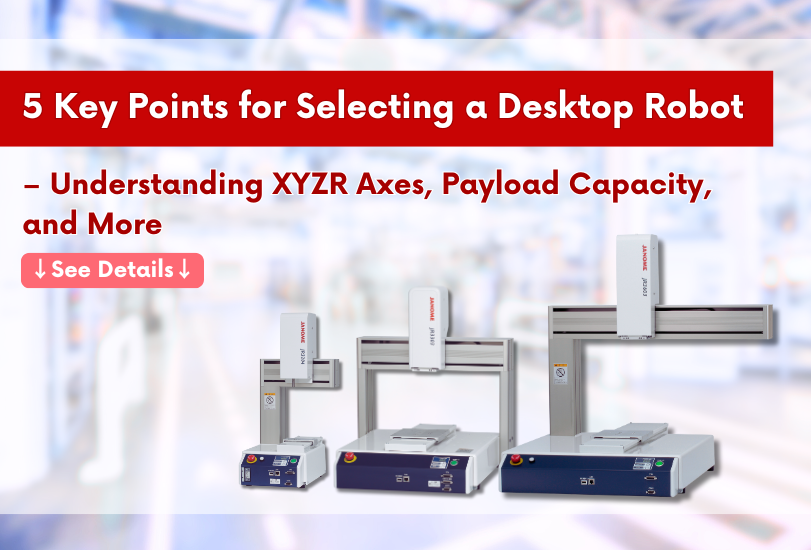
As the demand for automation continues to grow in manufacturing environments, compact and easy-to-deploy desktop robots are gaining increased attention.
However, when it comes time to actually implement one, many users find themselves unsure about which model to choose or how much payload capacity they require.
This article provides a clear, technical explanation of five key factors to consider when selecting a JANOME desktop robot—such as XYZR axis configuration, payload capacity, control interface, and power specifications.
We hope it serves as a helpful reference when choosing the right robot for your specific application.
Note: The explanations in this article are based on the JR3000 Series.. Please note that some model configurations and item names may differ in the JR4000 Series. Be sure to check the specifications of each series when making your selection.
JANOME Desktop Robot Model Code
JANOME’s model codes reflect five key parameters that should be considered during the selection process.
By understanding the meaning of each element in the code, you can efficiently choosethe specifications that best match your application needs.
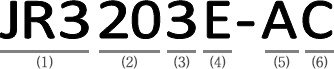
| (1) Device Type |
(2) X-Y Axes Stroke(mm) |
(3) Number of Axes |
(4) Encoder・Product Type |
(5) Operation Panel Specifications |
(6) Power Supply Specifications |
|---|---|---|---|---|---|
|
JR3000 Series |
20: 200×200 30: 300×320 40: 400×400 50: 510×510 60: 510×620 |
2: 2 Axes 3: 3 Axes 4: 4 Axes |
E: Encoder Included N: Without Encoder F: Heavy Duty Robot |
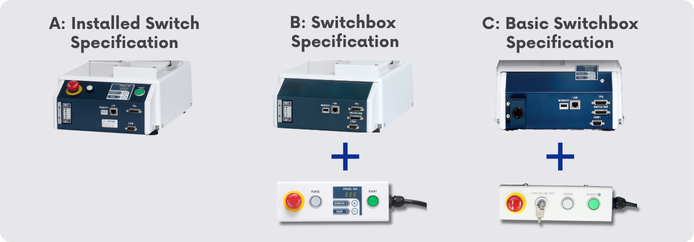
A: Installed Switch Spec B: Switchbox Spec C: Basic Switchbox Spec |
C:mainly the EEA and Korea J:mainly Japan |
*For the JR4000 Series model code, please refer to this page.
1. Size – Operating Range and Payload Capacity
JANOME’s desktop robots are available in five different sizes (see table below).
When selecting a model, be sure to choose the appropriate size based on your required operating range and payload capacity.
| Operating Range [mm] | Maximum Portable Load [kg] *2 | ||||
|---|---|---|---|---|---|
| X | Y | Z | R*1 | Workpiece | Tool |
| 200 | 200 | 50 | ±360° | 7 | 3.5 |
| 300 | 320 | 100 | 15 | 7 | |
| 400 | 400 | 150 | |||
| 510 | 510 | ||||
| 510 | 620 | ||||
*1: For a 4-axis robot.
*2: The JR3000 series with a Heavy-Duty specification can handle workpieces up to 20 kg.
2. Number of Axes (XYZ + R Axis)
JANOME offers both 3-axis and 4-axis models.
If your application requires rotational motion of the tool, please select a 4-axis model equipped with an R-axis.
3. Encoder and Product Types
We offer the following specifications tailored to different applications:
| Model Code | Specification Overview |
|---|---|
| N | Without Encoder |
| E | Encoder Included (enables step-out detection and error-stop functionality) |
| F | Heavy-Duty Model (supports up to 20 kg for the workpiece and 15 kg for the tool) Available in two sizes: 300×320 and 400×400 (dual-arm support) 
|
| T | Twin-Table Model (Equipped with two X-tables, enabling simultaneous processing and setup operations.)
|
| ERT | PCB Depaneling Model with Upper side Dust Collection Type |
| EBV | PCB Depaneling Model with Underside Dust Collection Type |
| ST | Dedicated Screw Fastening Model |
| AP-D | Dedicated Dispensing Model with Position and Height Adjustment Using Vision and Sensors |
About the Encoder-Included Specification
Since desktop robots use stepper motors, they may experience a phenomenon known as "step-out" under overload conditions, potentially leading to positioning errors.
Models equipped with encoders can detect such abnormalities and automatically trigger an error stop when step-out occurs, helping to maintain product quality.
4. Control Interface Options (Start Switch and Program Select Placement)
You can choose from three configuration options based on where the program number is displayed and switched, as well as where the start operation is performed.
5. Power Supply Specification (Outlet Options)
his selection refers to whether the robot includes a power outlet, and if so, what voltage it supports.
C:No outlet included
(No symbol): Outlet included (supports 200V)
Y: Outlet included (supports 100V)
Need Help Choosing the Right Desktop Robot?
The optimal configuration of a desktop robot varies depending on the application and operating conditions.
We can provide expert recommendations based on real-world use cases to help you answer key questions such as “Which size and number of axes are suitable?” or “Do I really need an encoder or a 4-axis model?”
For more detailed comparisons and application-specific selection examples, please refer to the resources below:
Download the Desktop Robot Product Catalog Contact Us for Selection Support or a Quotation