
Please Ask About Special Specifications
Do you need a customized design?
We offer several variations to meet specific size and configuration requirements.
The JR4000 Series, a new flagship model, is a desktop robot designed for PCB depaneling.
Equipped with a spindle motor, it enables router cutting for precise PCB contour processing.
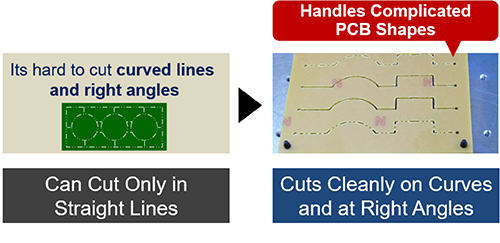
The router cutting method minimizes stress on PCBs while creating smooth cutting edges.
With advanced CP control, the high-performance robot ensures consistent and precise cuts, from curves to straight lines.
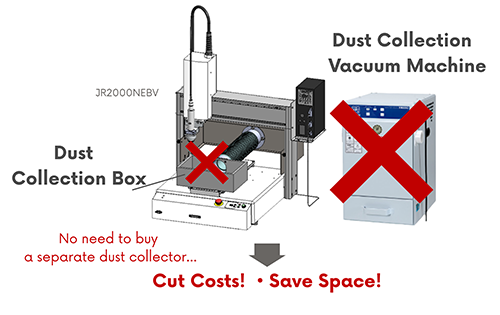
The adoption of an overhead dust collection system eliminates the need for a separate dust collector.
This flexible design allows installation in limited workspaces, enhancing production line layout flexibility.
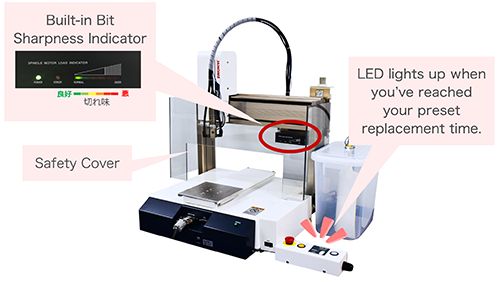
Equipped with a customizable "Notification Timer" to set blade replacement timing freely.
The system detects cutting load and positional deviations, automatically stopping in case of abnormalities.
Operators can work with confidence thanks to its safety-focused design.
The cutting torque is visualized via an indicator, allowing easy monitoring of the processing status.
Additionally, a safety cover* ensures operational safety during use.
* The safety cover is optional for the JR4503ERT. Also, the JR4603 does not come with a safety cover. Please prepare a safety cover at the user side.
The JR4000 Series supports position correction (offset correction) using a USB camera (optional).
Even if the workpiece position shifts, the system calculates the offset from the camera image, enabling accurate cuts after correction.
This feature achieves high-precision correction processing with an affordable USB camera.
JR C-Points III is Janome's proprietary program input system for creating, editing, and saving teaching and customization data on a PC.
The software features an intuitive and user-friendly interface with large icons and easy-to-navigate screens, making it simple for beginners to operate.
Create Cutting Programs Easily
① Camera Image/Point Graphic Area
Perform intuitive teaching by clicking on the screen while viewing the camera image.
Alternatively, switch to the graphic editing screen to teach cutting paths from CAD data.
②Programming Area
Create programs easily using icons. Direct numerical input and editing are also supported.
③Robot Operation Area
Perform jog operations using operation icons.
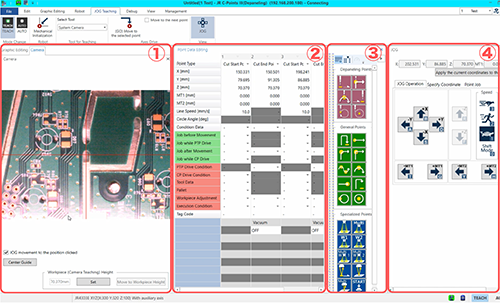
By connecting a USB camera, you can specify points while viewing enlarged images on the PC screen and perform easy and accurate teaching with icon-based operations.
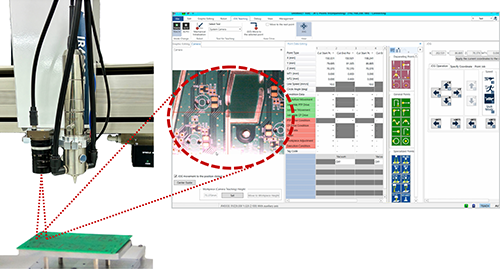
The JR4000 Series now supports position correction (offset correction) using a USB camera.
Even if the workpiece position shifts, the system calculates the offset from the camera image and performs accurate cutting at the corrected position.
This feature eliminates the need for a dedicated camera, utilizing a standard USB camera for position adjustment.
Import DXF files, JPG files, and more to intuitively create and edit points, lines, circles, and arcs on the PC.
Positioning and path adjustments can be performed on-screen, ensuring precise specification even for challenging areas.
The JR4000 Series supports spline curve imports and new UI features, enabling quick creation of cutting programs based on DXF files.
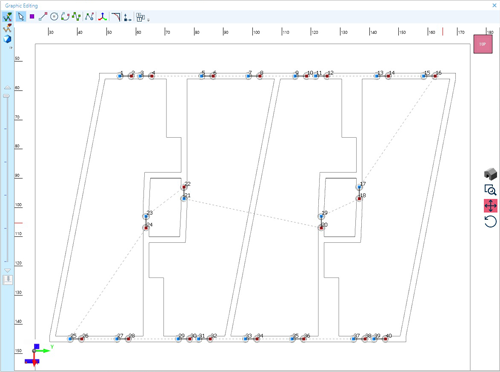
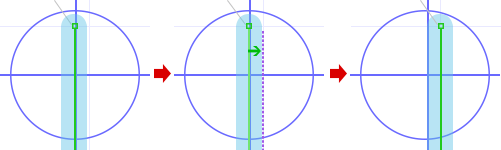
Specify the blade diameter to offset the cutting path by the blade radius.
This allows for easy alignment and reconfiguration during program creation.
The PC software supports Japanese, English and Chinese (Simplified/Traditional).
Menus and operation screens can be easily switched between languages, ensuring a consistent user experience across global locations.
The teaching pendant supports 11 languages: Japanese, English, French, Spanish, Italian, German, Korean, Chinese (Simplified/Traditional), Czech, and Vietnamese.
Easily switch the operation screen language, making it ideal for use in international teams or overseas facilities.
Register up to 999 programs and 32,000 points.
This flexibility supports multi-product, small-lot production lines, and automated processes.
Do you need a customized design?
We offer several variations to meet specific size and configuration requirements.

Test your process on our machines. Please contact us for more information.